I have been looking and tracking netbooks for several weeks as I travel a lot and have been seriously considering getting something smaller to tote around besides my 2 year old Gateway MX6455. I searched and scoured the web for any info about these devices to see what it might be like to own and use one.
Well the opportunity came up the other day to make the purchase and I decided on the ASUS Eee PC 1000HE 10-Inch Netbook manufactured by ASUS and being sold by Amazon.com.
In fact, Amazon played a big role in my decision because there are some very solid reviews about this device and it certainly is a good sign when only 15 reviews are 3 stars or less out of almost 270! 209 were 5 stars and 44 were 4 stars (that is as of this post). To me that is an overwhelming endorsement from those who bought this. I was sold and had the ASUS overnighted and it arrived yesterday (Thursday 9 Apr 09).
The specs on this fancy little machine:
- 10-inch LED-backlit widescreen LCD (1024×600)
- 1.66 GHz Intel Atom N280 Processor
- 1 GB RAM (which I upgraded to 2 GB
as suggested by many of the reviews at Amazon.com)
- 160 GB Hard Drive (partitioned into 3 drives – 82 GB for Windows XP Home, 61 GB empty and 5 GB restore partition)
- 10 GB Eee Storage
- 2-in-1 MMC and SD(SDHC) flash card slot
- 1.3 megapixels webcam built in
- WLAN: 802.11b/g/n
- Build-in stereo speakers, high-definition audio CODEC, Digital Array Microphones
- 1 x VGA port (D-sub 15-pin for external monitor), 3 x USB 2.0 ports, 1 x LAN RJ-45, 2 x audio jacks: headphone & mic-in
- Bluetooth V2.0
- Windows XP Home
- Up to 9.5 Hours Battery Life; 8700mAh
- Blue Metallic Color
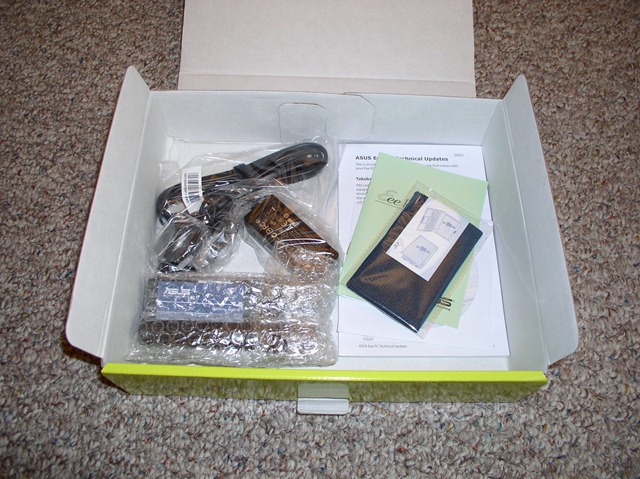
So of course the first thing to do is unbox it. The box was light and small as would be expected for a netbook weighing only 3.2 pounds:
After getting everything checked out and setup I started the setup of Windows XP Home Edition. Ahh such sweet memories – it has been a very long time since I have stared Windows XP Home down! Networking is still a challenge with XP Home even on a netbook.
The OOBE is very similar to anything you will see on a desktop or laptop PC so no news there:
Now – Windows XP Home is a fine system – but like I said – it has been so long since I worked in it that I knew I was not staying with that very long. So I broke out my Windows Beta 1 DVD and upgraded to Windows 7.
Wait though – there was one small issue – netbooks do not have CD or DVD ROM drives. So after a quick search online I found a few different methods to upgrade the netbook (actually to install a dual boot between Windows 7 and Windows XP Home Edition.
I used this method written up by the Technicist as the basis for doing the upgrade install and creating the dual boot. I did not have to do anything partition related because there was already an empty partition to use for Windows 7.
I used a 60 GB Western Digital USB Hard Drive and created a 10 GB partition on it then made it the primary and active partition using Windows Disk Management Console. I then copied all of the Windows 7 DVD files to that partition. All of this I did on my desktop Windows Vista install.
I then unplugged the drive and plugged it into the netbook. I then had to go into the ASUS bios and set the system to boot off a removable USB device. After saving and exiting the bios setup the netbook restarted and it picked up the bootable USB device and started the Windows 7 installation:
Note: Remember to unplug the hard drive during the first reboot or you will see the install process start all over again.
Setup of Windows 7 took about 40 minutes total. Compared to my desktop it was only about 15 minutes longer. After everything was done and I was in Windows 7 only two devices unrecognized or needing drivers. One was the ACPI driver – it showed up as unknown in Device Manager and the other was the Atheros LAN adapter. I grabbed both driver files (Windows XP versions) from the ASUS Support website and installed them in Windows 7 without a problem.
In the process of getting all my typical software installed I put the Windows Home Server (WHS) Connector software on the system so it will get backed up each night. That itself was not a problem but it got me thinking about restoring the netbook in case of any issues – one of the bennies of having WHS running in the house. See the rub is that WHS uses a CD-ROM based recovery. You boot from the WHS Recovery CD and restore your drive image. Without a CD-ROM in the netbook this presents a problem. However, using the same principles as I did for installing Windows 7 I think I can set up the Western Digital USB Drive with the WHS Recovery CD files and boot to it to do the restore. I guess that is a subject for another blog post.
Check out the difference between my 15.4 inch Gateway MX6455 (now the wife’s laptop) and the ASUS Eee PC 1000HE 10-Inch Netbook. The ASUS also beats the Gateway by weight as well 3.2 lbs for the ASUS compared to 6.5 lbs for the Gateway.
Now lets talk a little about the experience of using the netbook (and this is based off 24 hours of use so far).
- Fingerprint Magnet – a lot of the reviews at Amazon mentioned this. The system came with a nice cloth and carry case to help out with it. No show stopper at all.
- Keyboard is 92% of full size. It is taken some getting used to but it is not undoable. Reviewers mentioned the movement of the Right Shift key to its “proper” position left of the arrow keys. Works for me.
- Battery life – I have only been through one cycle so far but it is very impressive. When 10% is left and you still have 40 minutes of time left that will do me just fine.
- Windows XP Home – it ran just fine with the netbook and ASUS had provided all the software necessary to manage the system from power to multi-touch. Windows 7 has all of that built in and required no additional software to have multi-touch functionality. Color me impressed.
- The screen is vibrant and clear. It is a backlit LCD screen and it just pops out at you whether your on battery on a reduced setting or plugged in and charging.
- Program scaling. The resolution on the ASUS is 1024 x 600. Everything I have run so far, with one exception,has scaled perfectly to work within that resolution. Unfortunately, the one exception was blu – the WPF Twitter client. The program runs just fine but the entire bottom half of the Window where all the interaction is with your timeline is on-existent. I can still scroll the tweets on that tab but that is it.
Those are just a few items for me and I am sure as I move beyond the 24 hour mark I will find other plusses – and yes – most likely some negatives as well. However, at this point I am very impressed and would recommend this system to anyone looking for an alternative to a full size laptop.
I am really looking forward to my first road trip with the 1000HE and being able to put it through its road paces.

Related Posts
- The Value of Windows 7 Backup and Restore
- Setting Up A New Laptop
- How To: Use an SSD Drive as Main Drive for Windows 7
- System Imaging and Restoral with Windows 7
- Delete Windows.Old Folder After Installing Windows 7
This post first appeared on WindowsObserver.com. If you enjoyed it please make sure you subscribe to the RSS feed and join our Facebook Fan Page to stay up to date.


Subscribe to
Thanks for the great review. I have not used Win 7 beta yet, but must admit to being very intrigued.
@DaKing240 Here is my review/comments about mine – http://bit.ly/YaTPB
@MooseStuff Here is a blog entry I did about it – http://bit.ly/YaTPB
RT @winobs WindowsObserver.com » ASUS Eee PC 1000HE Review and Commentary http://tinyurl.com/cpljln
Tom – congrats on the 1000HE purchase did you also upgrade to 2GB as well?
Hi Rich,
I ended up purchasing the 1000he. I’m 100% satisfied as well so far. Now I just have to keep my wife from taking it.
Thanks again for your review,
Tom
Hi Rich,
I ended up purchasing the 1000he. I’m 100% satisfied as well so far. Now I just have to keep my wife from taking it.
Thanks again for your review,
Tom
@ccmn2000 It does – http://bit.ly/vXv8K
@jeremya I recommend the ASUS Eee PC 1000HE – http://bit.ly/pBtVS
Tom,
I am still 100% absolutely satisfied with this purchase. Zero regrets and I have been recommending it to everyone I possibly can
Rich
Tom,
I am still 100% absolutely satisfied with this purchase. Zero regrets and I have been recommending it to everyone I possibly can
Rich
Thanks for your write-up, it’s definitely helping to sway me to get the 1000he. I hope you are still happy with your purchase.
How I installed Windows 7 on my Asus Eee PC 1000HE netbook – http://bit.ly/pBtVS
@HarperMD The bootable HD is easy – here is how I did it – http://bit.ly/pBtVS
RT @WinObs: I wrote a review about it and how to install Windows from a USB hard drive – http://bit.ly/pBtVS ME: excellent post on 1000HE.
Kris,
Thanks for coming back and letting us know what you discovered. I hope you will comment later once you receive your machine and let us know how the faster RAM works out.
Kris,
Thanks for coming back and letting us know what you discovered. I hope you will comment later once you receive your machine and let us know how the faster RAM works out.
The commentary that I am finding is esoteric and somewhat confusing. I see people saying both that the 800 MHz is better for over-clocking, and, conversely, that the older chipset freezes the memory at 533 MHz. So I’m really not sure what to think. I’m getting the 800 MHz anyway, because it’s only a few bucks more, and I want to hedge my bets. I don’t tend to be much of an over-clocker, so it’s probably a moot point. Sorry that I couldn’t be more help.
Kris,
Let me know what you find – I used Amazon reviews for most of my research before I made this purchase.
Kris,
Let me know what you find – I used Amazon reviews for most of my research before I made this purchase.
I have yet to find a clear comparison online; that’s my task for today.
I just bought the ram that was suggested on the Amazon.com page as compatible. I guess I could have gotten the faster RAM – wonder what kind of difference it would make?
Actually, I had one question that I forgot to add to the list. You strike me as someone who is extremely computer proficient: is there any particular reason that you shied away from the 800 MHz RAM, and went with stock speeds? Thanks again.
Thanks for the response. What I was most wondering, however, was how Win 7 works with this particular netbook. Do you believe that the 1000 HE will run, say, Photoshop CS4, faster on Win 7 (with the RAM upgrade) than it will on XP Home? Have you run into particular advantages in using Win 7 on the 1000 HE? I read that the Win 7 “netbook version” was going to limit users to three applications at a time. I imagine that this would prompt you to install the full version. Thanks again. I’m ordering mine next week; can’t wait (I have never been excited about a notebook/netbook before).
Kris – thanks for the great comment. So far any of my programs that I ran on Vista run on Windows 7 (including drivers). There are some changes needed to some programs in the way the use jumplist or Systray vs taskbar. The new GUI for Windows 7 is superb – lots of flex in it for getting things done. The trackpad can be disabled – I use a bluetooth mouse most of the time myself.
Hi there. Thanks for the great review. I have not used Win 7 beta yet, but must admit to being very intrigued. Can you write a bit more about your experience with it on this notebook? I am particularly interested in program compatibility, performance vs XP/Vista, ability to smoothly multitask and added GUI features. Also, can you easily turn off the trackpad, if you just plan on writing for a while. Thanks again!
(oh, and I think you have sold me on the blue one as well)
Hi there. Thanks for the great review. I have not used Win 7 beta yet, but must admit to being very intrigued. Can you write a bit more about your experience with it on this notebook? I am particularly interested in program compatibility, performance vs XP/Vista, ability to smoothly multitask and added GUI features. Also, can you easily turn off the trackpad, if you just plan on writing for a while. Thanks again!
(oh, and I think you have sold me on the blue one as well)
[...] Prints: Much like my ASUS Eee PC 1000HE, this thing is a finger print magnet. From the touch screen itself to the chrome bezel around the [...]
@DaKing240 Here is my review/comments about mine – http://bit.ly/YaTPB
On Twitter, Windows Observer said: @MooseStuff Here is a blog entry I did about it – http://bit.ly/YaTPB
More on Topsy.com
RT @winobs WindowsObserver.com » ASUS Eee PC 1000HE Review and Commentary http://tinyurl.com/cpljln
On Twitter, Windows Observer said: @ccmn2000 It does – http://bit.ly/vXv8K
More on Topsy.com
On Twitter, Windows Observer said: @ccmn2000 It does – http://bit.ly/vXv8K
More on Topsy.com
[...] – I would get at least Windows 7 Home Premium or Professional Edition for my ASUS Eee PC 1000HE net book. It is currently running the Windows 7 Release Candidate like a champ so I do not believe I [...]
On Twitter, Windows Observer said: @jeremya I recommend the ASUS Eee PC 1000HE – http://bit.ly/pBtVS
More on Topsy.com
On Twitter, Windows Observer said: How I installed Windows 7 on my Asus Eee PC 1000HE netbook – http://bit.ly/pBtVS
More on Topsy.com
On Twitter, Windows Observer said: How I installed Windows 7 on my Asus Eee PC 1000HE netbook – http://bit.ly/pBtVS
More on Topsy.com
On Twitter, Windows Observer said: @HarperMD The bootable HD is easy – here is how I did it – http://bit.ly/pBtVS
More on Topsy.com
On Twitter, Tarun Chachra said: RT @WinObs: I wrote a review about it and how to install Windows from a USB hard drive – http://bit.ly/pBtVS ME: excellent post on 1000HE.
More on Topsy.com
On Twitter, Windows Observer said: I wrote a review about it and how to install Windows from a USB hard drive – http://bit.ly/pBtVS
More on Topsy.com
On Twitter, Judy said: RT @WinObs @scrapplesandwic I have the same netbook – really love it with Windows 7 – http://bit.ly/pBtVS <==Good Review, TY
it helps
More on Topsy.com
[...] with my purchase of the ASUS Eee PC 1000HE (reviewed here) and its wireless N capability as well as the limited range my Gateway MX6455 gets around the house [...]
[...] Eee 7 Laptop WindowsObservercom ASUS Eee PC 1000HE Review and Commentary I found some cool stuff here: WindowsObservercom ASUS Eee PC 1000HE Review and [...]